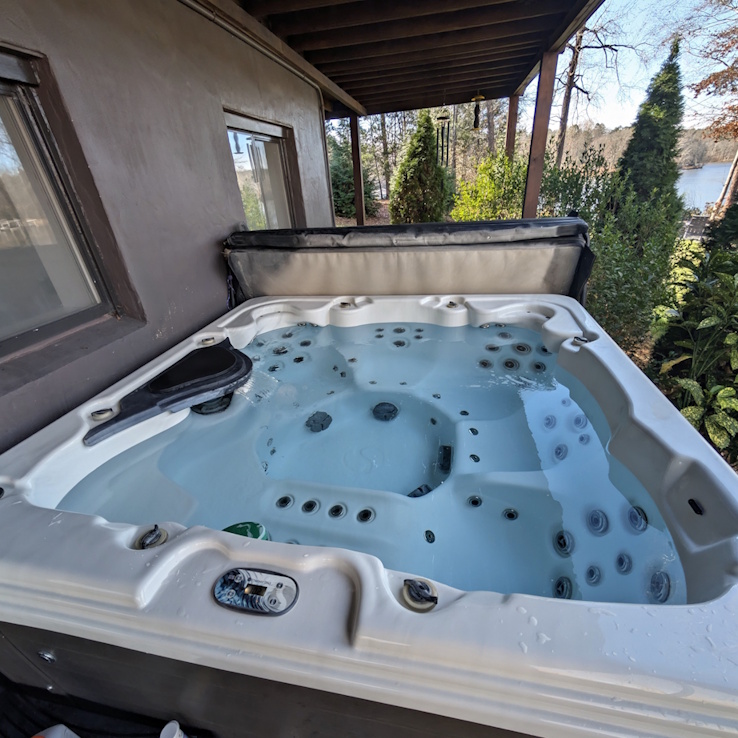
Keeping the Spa Clean and Warm
- When you’re finished enjoying the spa for the day, please add one scoop of shock. This helps keep the water fresh and ready for the next use.
- Also, kindly place the cover back on when the spa isn’t in use. An uncovered spa loses heat quickly and ends up using a lot of extra energy to stay warm.
- There will typically be a bromine “frog” in the hot tub. Please keep this in the tub to keep the sanitizer levels correct. There may also be a bromine tube in the skimmer. Please also leave this in place.
- A net is provided to scoop out any debris from the trees etc.
🚫 Hot Tub House Rules
To keep the hot tub clean, safe, and ready for all guests:
- No eating in the hot tub. Food, crumbs, and oils create sanitation issues and can damage filters.
- No glass in or near the hot tub. Please use plastic or insulated containers only.
- Quick rinse before entering, especially if you’ve used lotions, oils, sunscreen, or have been eating — it helps keep the water clear.
- Be mindful of spills and debris. If a spill or contamination occurs, please notify us immediately so we can address it properly.
- Excessive mess or contamination requiring additional cleaning may result in an additional cleaning fee.
- You’ll see a small floating thermometer in the hot tub. It sends us alerts if the water temperature goes out of range, which helps us make sure everything is working properly for your stay. Please leave the sensor in the tub whenever possible. If you need to remove it briefly, we appreciate you returning it as soon as you can.
These rules help keep the hot tub enjoyable for everyone. We appreciate your help taking care of it.
To open the hot tub cover:
- Release the latch on the side closest to the stairs (near the center).
- Place one hand in the center and gently push it straight back onto the rollers behind the tub.
⚠️ Do not slide the cover onto the ground. It should rest fully on the rollers. - Enjoy the soak. 🛁
To turn on the hot tub:
-
The pump will run periodically to keep the water clean and warm.
If you’re getting in and the pump isn’t running, you can press the Pump 1 button to turn the main pump on and to shift between low and high speeds.
-
Low speed will automatically turn off after 2 hours, and high speed will turn off after 15 minutes.
To turn on the bubbles:
-
Turn on the hot tub (see section above)
Press the Pump 2/3 button once.
To turn off the bubbles:
-
Press the Pump 2/3 button three times. (The bubbles will stop on the second press. Pressing once more will ensure that the system is ready to create bubbles on the next press.)
Changing the target Temperature:
-
Press TEMP once. The display will flash.
-
Press TEMP once for each degree to change the temperature before the screen stops flashing.
-
The temperature will either increase or decrease. To change in the opposite direction, wait for the flashing to stop, then repeat the step above.
-
Max temperature is 104. If set to 104 and the temperature button is pressed again, the temperature setting will begin to decrease.
NOTE: The hot tub can only warm the water slowly – maybe 5-10 degrees an hour.
To close the hot tub cover:
- From inside the tub, grab the handle on the cover and gently pull it forward along the rollers until it’s mostly closed.
- Add one scoop of shock.
- Close the rest of the way and visually check that the cover is centered on the tub.
- Secure the center latch on the side closest to the stairs.
- Please always keep the hot tub covered when not in use. The cover helps keep the water clean and greatly reduces the energy needed to keep the tub heated. 🛁
If the tub is much colder than the setpoint
-
Check the system mode by pressing TEMP followed by LIGHT.
The screen will display the new 2mode (St, Ec, or Sl)
To change the mode again, wait for the screen to clear, and then press TEMP followed by LIGHT.
-
For Cold weather, run st; for warm weather, run ec; when away, run sl.
If anything comes up before or during your stay, please reach out to us through the app you booked with (Airbnb or Vrbo) so we can assist you right away.