

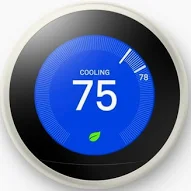
How to Use the Nest Thermostat (Gen 3)
IMPORTANT: Please keep the temp within limits
Please keep the heat above 60 degrees and the AC below 80 degrees. This will help ensure that no damage occurs to the house.
Where is the thermostat?
The thermostat is located in the great room near the wall going towards the right bedroom (as you are facing the kitchen).
Viewing the Current Temperature:
The thermostat will show you the current room temperature in the center of the display. The set temperature (what you want it to reach) will be shown around the edges.
Adjusting the Temperature:
To turn the temperature up or down, simply rotate the outer ring of the thermostat. Turning it clockwise will increase the temperature (heat), and turning it counterclockwise will decrease it (cool).
Switching Between Heating and Cooling:
Press the thermostat display once to bring up the menu. Then rotate the ring to highlight the mode you want (Heat, Cool, or Heat•Cool for automatic switching) and press the display again to select it.
If anything comes up before or during your stay, please reach out to us through the app you booked with (Airbnb or Vrbo) so we can assist you right away.